Brightlayer Industrial1.7.6 - App Store

Please wait ... The app listing is being verified for availability.
You'll be able to see results in few seconds.


Publisher Description

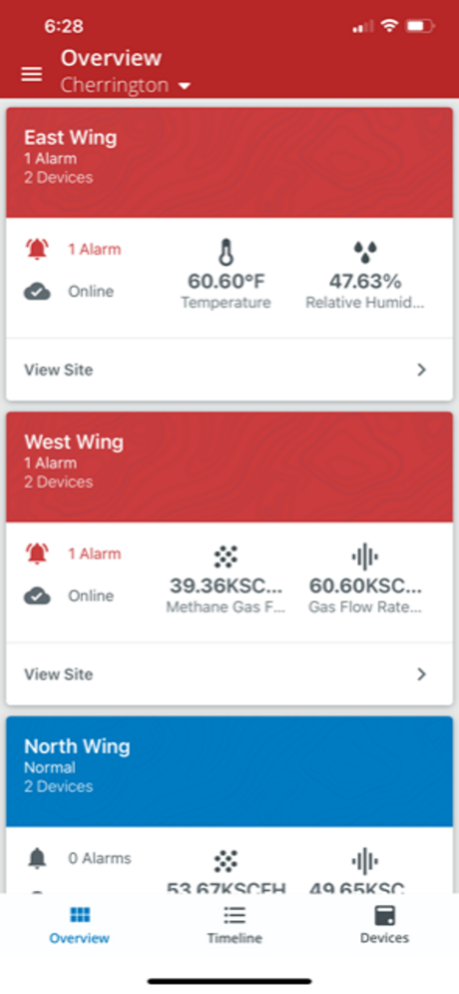
The Brightlayer Industrial remote monitoring app features a single platform to help facility, operations and maintenance managers increase productivity, mitigate risk and support metrics that help do more with your power and people.

Smart. Organized. Efficient.

Industrial managers not only work in some of the harshest environments, they deal with operational challenges that increase risk to their people, assets and the bottom line. But with the right data in hand, they can protect their personnel and equipment, make decisions that maximize revenue-generating space and reduce capital investments.

This app collects and aggregates operational and maintenance data across manufacturing equipment that uses industry-standard output protocols-including multiple sources and locations-for a unified view of your equipment, processes and facilities.

Date analytics

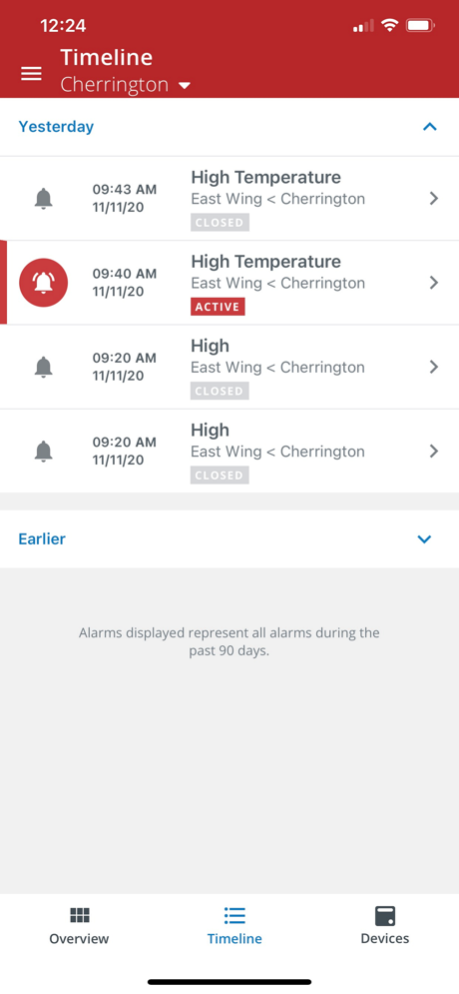
Thanks to maintenance IoT technologies, the application compares various parameters and offers feedback whenever deterioration is detected or when equipment performs outside of a desired range.

Equipment comparison

Watch multiple performance parameters. By understanding parameter differences over time, you can better understand the conditions that cause undesirable performance and adjust. This is feature is especially useful when comparing similar equipment across sites.

Historical reporting and analysis

The Brightlayer Industrial suite eliminates manual tracking and enables stakeholder-automated reporting to keep everyone informed. Authorized users can improve operational efficiencies with easily downloadable data in formats designed specifically for your management team. You’ll eliminate the need for creating laborious spreadsheets.

Features:

. Ease of installation and commissioning
. Wireless
. Lower data gathering costs
. Zone rated

Eaton recognizes your operational challenges, which is why we designed an app that leverages the power of a single platform to deliver real-time data analysis and metric tracking to improve labor efficiencies and manage financial risk.

www.eaton.com/BrightlayerIndustrial

Cybersecurity is at the core of our “secure by design” philosophy, and it’s embedded in all the Intelligent Power products and platforms, we bring to market.

Requirements - Initial login credentials are required from your company Brightlayer Administrator or Eaton Brightlayer representative, additionally this application is compatible with iPhone 6,8, Xs,.11.

Version History What’s New

This update brings significant improvements to commissioning and managing Eaton’s Champ Intelligent lighting over secure BLE Mesh:

Power‑loss recovery: The system no longer requires real‑time clock re‑sync after outages longer than 90 minutes. Lighting profiles automatically resume normal operation, improving compatibility with panel‑level photocells.

Enhanced daylight harvesting: More accurate sensing and smoother transitions, now capable of dimming down to 10% brightness.

Improved safety response: Faster over‑temperature protection ensures more reliable operation in demanding environments.

Major firmware update performance boost: Firmware update time has been reduced from 36 hours to just 9 hours for approximately 100 lights.

Clearer update guidance: Improved error handling with step‑by‑step instructions during firmware and control profile updates.

Per‑device firmware updates: Update individual devices as needed for more flexible maintenance and troubleshooting.

Safety‑first update mode: All lights automatically switch to 100% brightness during firmware updates to ensure visibility and safety.

Firmware integrity protection: Non‑compatible firmware is automatically blocked during commissioning and mesh‑wide updates to prevent configuration errors. 1.7.6 Aug 6 What’s New

This update brings significant improvements to commissioning and managing Eaton’s Champ Intelligent lighting over secure BLE Mesh:

Power‑loss recovery: The system no longer requires real‑time clock re‑sync after outages longer than 90 minutes. Lighting profiles automatically resume normal operation, improving compatibility with panel‑level photocells.

Enhanced daylight harvesting: More accurate sensing and smoother transitions, now capable of dimming down to 10% brightness.

Improved safety response: Faster over‑temperature protection ensures more reliable operation in demanding environments.

Major firmware update performance boost: Firmware update time has been reduced from 36 hours to just 9 hours for approximately 100 lights.

Clearer update guidance: Improved error handling with step‑by‑step instructions during firmware and control profile updates.

Per‑device firmware updates: Update individual devices as needed for more flexible maintenance and troubleshooting.

Safety‑first update mode: All lights automatically switch to 100% brightness during firmware updates to ensure visibility and safety.

Firmware integrity protection: Non‑compatible firmware is automatically blocked during commissioning and mesh‑wide updates to prevent configuration errors. 1.7.5 Feb 16 Bug fixes and Enhancements 1.7.4 10/17/2025 Bug fixes and Enhancements 1.7.3 04/22/2025 Bug fixes and Enhancements 1.7.2 11/24/2024 Bug fixes 1.7.1 08/24/2024 The key updates associated with this release are as follows: Expanded feature set for light devices. General operational improvement. 1.7.0 07/26/2024 Bug Fixes and Improved User management 1.5.1 09/06/2023 Brightlayer Industrial has added capability where user can add Eaton BLE Mesh devices. This allows user to create a mesh of Eaton BLE Mesh of light devices which can be controlled for various operations like mesh dimming, data viewing, grouping. This release also has additional features of user self-registration for faster user onboarding and using the app. 1.5.0 07/21/2023 Improvements:
- Performance improvements with the Trendviewer function
- General defect fixes 1.4.2 03/04/2023 -Display online and offline devices on the main screen
-Dynamically add/remove device icons
-Improved app performance
-Integrate event-based telemetry
-User ability to delete site, gateway and devices
-Independently display device properties
-Support Eaton WAN-enabled devices
-Alert users when device goes offline 1.4.1 11/15/2022 Ability to add a note when acknowledging an alarm.
Ability to view the trend data of individual devices.
Ability to modify baud values from the user interface.
Ability to select > 50 devices of the same type or 20 devices of different types, per gateway. This requires updating the Sierra Wireless gateway to firmware version 3.4.0. or later. 1.4.0 06/02/2022 The Device Details tab displays device metrics
The Condition Index tab displays temperature, humidity and load graphs
The Sensor Trends tab displays 3 months (default) and 12 months of data for selected variables: Qmax, PDI, PPC
The Phase Resolved Graph tab displays related data for active channels 1.3.4 05/03/2022 - Alarm Timeline was updated to identify the actual cause of the alarm and the device name
- Device Name was added to the Alarm Summary to identify the affected device
- An inconsistency in the title for Temperature Alarm (between Web and Mobile app) was corrected
- Data Trend was updated to accurately represent the case where the recorded value is zero. 1.3.3 03/15/2022 Provide customer with an accurate representation of current status of child devices connected to a device under a site beyond the previous gateway connectivity status
Added additional capacity to trending of data for each device to 10 channels, enabling a higher fidelity of analysis than what was previously available
Easier navigation, updated search capability on determining locations and management of site will enable a streamlined workflow, increasing productivity of users. 1.3.2 01/22/2022 Iconography updates for newly supported devices 1.3.1 10/01/2021 Brightlayer Industrial Release 1.3.0 brings new capabilities to Users within the Web and Mobile Apps through new management screens and workflows:
Users can now add and manage their Locations and Sites.
Users can now add and manage their Devices. 1.3.0 08/27/2021 Sierra Wireless Alarm Acknowledgement
Cautionary to Critical Alarm Notification 1.2.3 07/14/2021 1. Sierra Wireless Alarm Acknowledgement
2. Cautionary to Critical Alarm Notification 1.2.2 07/08/2021 Updated Technical Support contact information. 1.2.1 (10696) 03/12/2021 The new design provides you easier access to the application with Biometric Login and Role Based Access Control features. This includes allowing customer configuration of user access to the customer organization and customer locations. User views and notifications can be limited to only what an individual user needs. 1.2.0 (9668) 02/01/2021 1.1.0 11/13/2020


About Brightlayer Industrial

Brightlayer Industrial is a free app for iOS published in the Project Management list of apps, part of Business.

The company that develops Brightlayer Industrial is Eaton Corporation. The latest version released by its developer is 1.7.6.

To install Brightlayer Industrial on your iOS device, just click the green Continue To App button above to start the installation process. The app is listed on our website since 2026-10-14 and was downloaded 0 times. We have already checked if the download link is safe, however for your own protection we recommend that you scan the downloaded app with your antivirus. Your antivirus may detect the Brightlayer Industrial as malware if the download link is broken.

How to install Brightlayer Industrial on your iOS device:

  • Click on the Continue To App button on our website. This will redirect you to the App Store.
  • Once the Brightlayer Industrial is shown in the iTunes listing of your iOS device, you can start its download and installation. Tap on the GET button to the right of the app to start downloading it.
  • If you are not logged-in the iOS appstore app, you'll be prompted for your your Apple ID and/or password.
  • After Brightlayer Industrial is downloaded, you'll see an INSTALL button to the right. Tap on it to start the actual installation of the iOS app.
  • Once installation is finished you can tap on the OPEN button to start it. Its icon will also be added to your device home screen.

Program Details


General

Publisher
Released Date
2026-10-14
Languages
English

Category

Category
Subcategory

System requirements

Operating systems
iOS

Download information

File size
41 bytes
Total downloads
0

Pricing

License model
Free
Price

Version History


Here you can find the changelog of Brightlayer Industrial since it was posted on our website on 2023-09-06. The latest version is 1.7.6 and it was updated on Apps112 on 17 October, 2026. See below the changes in each version:

version 1.7.6

posted on 2026-10-14

Version History What’s New

This update brings significant improvements to commissioning and managing Eaton’s Champ Intelligent lighting over secure BLE Mesh:

Power‑loss recovery: The system no longer requires real‑time clock re‑sync after outages longer than 90 minutes. Lighting profiles automatically resume normal operation, improving compatibility with panel‑level photocells.

Enhanced daylight harvesting: More accurate sensing and smoother transitions, now capable of dimming down to 10% brightness.

Improved safety response: Faster over‑temperature protection ensures more reliable operation in demanding environments.

Major firmware update performance boost: Firmware update time has been reduced from 36 hours to just 9 hours for approximately 100 lights.

Clearer update guidance: Improved error handling with step‑by‑step instructions during firmware and control profile updates.

Per‑device firmware updates: Update individual devices as needed for more flexible maintenance and troubleshooting.

Safety‑first update mode: All lights automatically switch to 100% brightness during firmware updates to ensure visibility and safety.

Firmware integrity protection: Non‑compatible firmware is automatically blocked during commissioning and mesh‑wide updates to prevent configuration errors. 1.7.6 Aug 6 What’s New

This update brings significant improvements to commissioning and managing Eaton’s Champ Intelligent lighting over secure BLE Mesh:

Power‑loss recovery: The system no longer requires real‑time clock re‑sync after outages longer than 90 minutes. Lighting profiles automatically resume normal operation, improving compatibility with panel‑level photocells.

Enhanced daylight harvesting: More accurate sensing and smoother transitions, now capable of dimming down to 10% brightness.

Improved safety response: Faster over‑temperature protection ensures more reliable operation in demanding environments.

Major firmware update performance boost: Firmware update time has been reduced from 36 hours to just 9 hours for approximately 100 lights.

Clearer update guidance: Improved error handling with step‑by‑step instructions during firmware and control profile updates.

Per‑device firmware updates: Update individual devices as needed for more flexible maintenance and troubleshooting.

Safety‑first update mode: All lights automatically switch to 100% brightness during firmware updates to ensure visibility and safety.

Firmware integrity protection: Non‑compatible firmware is automatically blocked during commissioning and mesh‑wide updates to prevent configuration errors. 1.7.5 Feb 16 Bug fixes and Enhancements 1.7.4 10/17/2025 Bug fixes and Enhancements 1.7.3 04/22/2025 Bug fixes and Enhancements 1.7.2 11/24/2024 Bug fixes 1.7.1 08/24/2024 The key updates associated with this release are as follows: Expanded feature set for light devices. General operational improvement. 1.7.0 07/26/2024 Bug Fixes and Improved User management 1.5.1 09/06/2023 Brightlayer Industrial has added capability where user can add Eaton BLE Mesh devices. This allows user to create a mesh of Eaton BLE Mesh of light devices which can be controlled for various operations like mesh dimming, data viewing, grouping. This release also has additional features of user self-registration for faster user onboarding and using the app. 1.5.0 07/21/2023 Improvements:
- Performance improvements with the Trendviewer function
- General defect fixes 1.4.2 03/04/2023 -Display online and offline devices on the main screen
-Dynamically add/remove device icons
-Improved app performance
-Integrate event-based telemetry
-User ability to delete site, gateway and devices
-Independently display device properties
-Support Eaton WAN-enabled devices
-Alert users when device goes offline 1.4.1 11/15/2022 Ability to add a note when acknowledging an alarm.
Ability to view the trend data of individual devices.
Ability to modify baud values from the user interface.
Ability to select > 50 devices of the same type or 20 devices of different types, per gateway. This requires updating the Sierra Wireless gateway to firmware version 3.4.0. or later. 1.4.0 06/02/2022 The Device Details tab displays device metrics
The Condition Index tab displays temperature, humidity and load graphs
The Sensor Trends tab displays 3 months (default) and 12 months of data for selected variables: Qmax, PDI, PPC
The Phase Resolved Graph tab displays related data for active channels 1.3.4 05/03/2022 - Alarm Timeline was updated to identify the actual cause of the alarm and the device name
- Device Name was added to the Alarm Summary to identify the affected device
- An inconsistency in the title for Temperature Alarm (between Web and Mobile app) was corrected
- Data Trend was updated to accurately represent the case where the recorded value is zero. 1.3.3 03/15/2022 Provide customer with an accurate representation of current status of child devices connected to a device under a site beyond the previous gateway connectivity status
Added additional capacity to trending of data for each device to 10 channels, enabling a higher fidelity of analysis than what was previously available
Easier navigation, updated search capability on determining locations and management of site will enable a streamlined workflow, increasing productivity of users. 1.3.2 01/22/2022 Iconography updates for newly supported devices 1.3.1 10/01/2021 Brightlayer Industrial Release 1.3.0 brings new capabilities to Users within the Web and Mobile Apps through new management screens and workflows:
Users can now add and manage their Locations and Sites.
Users can now add and manage their Devices. 1.3.0 08/27/2021 Sierra Wireless Alarm Acknowledgement
Cautionary to Critical Alarm Notification 1.2.3 07/14/2021 1. Sierra Wireless Alarm Acknowledgement
2. Cautionary to Critical Alarm Notification 1.2.2 07/08/2021 Updated Technical Support contact information. 1.2.1 (10696) 03/12/2021 The new design provides you easier access to the application with Biometric Login and Role Based Access Control features. This includes allowing customer configuration of user access to the customer organization and customer locations. User views and notifications can be limited to only what an individual user needs. 1.2.0 (9668) 02/01/2021 1.1.0 11/13/2020

version 1.7.5

posted on 2026-07-31

Version History What’s New

This update brings significant improvements to commissioning and managing Eaton’s Champ Intelligent lighting over secure BLE Mesh:

Power‑loss recovery: The system no longer requires real‑time clock re‑sync after outages longer than 90 minutes. Lighting profiles automatically resume normal operation, improving compatibility with panel‑level photocells.

Enhanced daylight harvesting: More accurate sensing and smoother transitions, now capable of dimming down to 10% brightness.

Improved safety response: Faster over‑temperature protection ensures more reliable operation in demanding environments.

Major firmware update performance boost: Firmware update time has been reduced from 36 hours to just 9 hours for approximately 100 lights.

Clearer update guidance: Improved error handling with step‑by‑step instructions during firmware and control profile updates.

Per‑device firmware updates: Update individual devices as needed for more flexible maintenance and troubleshooting.

Safety‑first update mode: All lights automatically switch to 100% brightness during firmware updates to ensure visibility and safety.

Firmware integrity protection: Non‑compatible firmware is automatically blocked during commissioning and mesh‑wide updates to prevent configuration errors. 1.7.5 Feb 16 Bug fixes and Enhancements 1.7.4 10/17/2025 Bug fixes and Enhancements 1.7.3 04/22/2025 Bug fixes and Enhancements 1.7.2 11/24/2024 Bug fixes 1.7.1 08/24/2024 The key updates associated with this release are as follows: Expanded feature set for light devices. General operational improvement. 1.7.0 07/26/2024 Bug Fixes and Improved User management 1.5.1 09/06/2023 Brightlayer Industrial has added capability where user can add Eaton BLE Mesh devices. This allows user to create a mesh of Eaton BLE Mesh of light devices which can be controlled for various operations like mesh dimming, data viewing, grouping. This release also has additional features of user self-registration for faster user onboarding and using the app. 1.5.0 07/21/2023 Improvements:
- Performance improvements with the Trendviewer function
- General defect fixes 1.4.2 03/04/2023 -Display online and offline devices on the main screen
-Dynamically add/remove device icons
-Improved app performance
-Integrate event-based telemetry
-User ability to delete site, gateway and devices
-Independently display device properties
-Support Eaton WAN-enabled devices
-Alert users when device goes offline 1.4.1 11/15/2022 Ability to add a note when acknowledging an alarm.
Ability to view the trend data of individual devices.
Ability to modify baud values from the user interface.
Ability to select > 50 devices of the same type or 20 devices of different types, per gateway. This requires updating the Sierra Wireless gateway to firmware version 3.4.0. or later. 1.4.0 06/02/2022 The Device Details tab displays device metrics
The Condition Index tab displays temperature, humidity and load graphs
The Sensor Trends tab displays 3 months (default) and 12 months of data for selected variables: Qmax, PDI, PPC
The Phase Resolved Graph tab displays related data for active channels 1.3.4 05/03/2022 - Alarm Timeline was updated to identify the actual cause of the alarm and the device name
- Device Name was added to the Alarm Summary to identify the affected device
- An inconsistency in the title for Temperature Alarm (between Web and Mobile app) was corrected
- Data Trend was updated to accurately represent the case where the recorded value is zero. 1.3.3 03/15/2022 Provide customer with an accurate representation of current status of child devices connected to a device under a site beyond the previous gateway connectivity status
Added additional capacity to trending of data for each device to 10 channels, enabling a higher fidelity of analysis than what was previously available
Easier navigation, updated search capability on determining locations and management of site will enable a streamlined workflow, increasing productivity of users. 1.3.2 01/22/2022 Iconography updates for newly supported devices 1.3.1 10/01/2021 Brightlayer Industrial Release 1.3.0 brings new capabilities to Users within the Web and Mobile Apps through new management screens and workflows:
Users can now add and manage their Locations and Sites.
Users can now add and manage their Devices. 1.3.0 08/27/2021 Sierra Wireless Alarm Acknowledgement
Cautionary to Critical Alarm Notification 1.2.3 07/14/2021 1. Sierra Wireless Alarm Acknowledgement
2. Cautionary to Critical Alarm Notification 1.2.2 07/08/2021 Updated Technical Support contact information. 1.2.1 (10696) 03/12/2021 The new design provides you easier access to the application with Biometric Login and Role Based Access Control features. This includes allowing customer configuration of user access to the customer organization and customer locations. User views and notifications can be limited to only what an individual user needs. 1.2.0 (9668) 02/01/2021 1.1.0 11/13/2020

version 1.7.5

posted on 2026-02-16

What’s New

This update brings significant improvements to commissioning and managing Eaton’s Champ Intelligent lighting over secure BLE Mesh:

Power‑loss recovery: The system no longer requires real‑time clock re‑sync after outages longer than 90 minutes. Lighting profiles automatically resume normal operation, improving compatibility with panel‑level photocells.

Enhanced daylight harvesting: More accurate sensing and smoother transitions, now capable of dimming down to 10% brightness.

Improved safety response: Faster over‑temperature protection ensures more reliable operation in demanding environments.

Major firmware update performance boost: Firmware update time has been reduced from 36 hours to just 9 hours for approximately 100 lights.

Clearer update guidance: Improved error handling with step‑by‑step instructions during firmware and control profile updates.

Per‑device firmware updates: Update individual devices as needed for more flexible maintenance and troubleshooting.

Safety‑first update mode: All lights automatically switch to 100% brightness during firmware updates to ensure visibility and safety.

Firmware integrity protection: Non‑compatible firmware is automatically blocked during commissioning and mesh‑wide updates to prevent configuration errors.

version 1.7.4

posted on 2025-10-17

Oct 17, 2025
Version 1.7.4
Bug fixes and Enhancements

version 1.7.3

posted on 2025-04-22

Apr 22, 2025
Version 1.7.3
Bug fixes and Enhancements

version 1.5.1

posted on 2023-09-06

Sep 6, 2023
Version 1.5.1
Bug Fixes and Improved User management

version 1.5.0

posted on 2023-07-21

Jul 21, 2023
Version 1.5.0
Brightlayer Industrial has added capability where user can add Eaton BLE Mesh devices. This allows user to create a mesh of Eaton BLE Mesh of light devices which can be controlled for various operations like mesh dimming, data viewing, grouping. This release also has additional features of user self-registration for faster user onboarding and using the app.

Disclaimer


Official App Store Link


We do not host Brightlayer Industrial on our servers. We did not scan it for viruses, adware, spyware or other type of malware. This app is hosted by Apple and passed their terms and conditions to be listed there. We recommend caution when installing it.

The App Store link for Brightlayer Industrial is provided to you by apps112.com without any warranties, representations or guarantees of any kind, so access it at your own risk.

If you have questions regarding this particular app contact the publisher directly. For questions about the functionalities of apps112.com contact us.


Click stars to rate this APP!

Users Rating:
  0.0/5     0
Downloads: 0
Updated At: 2026-10-17
Operating System: iOS
License Type: Free

TOP DOWNLOADS
in Business last week